Extending
Warning
This section needs to be updated as it refers to earlier versions of the framework.
You are not limited to the components that are provided. You can create your own components and use them in your experiments. The toolkit is designed to be extensible. By following the pattern provided you can create your own components and use them in your experiments.
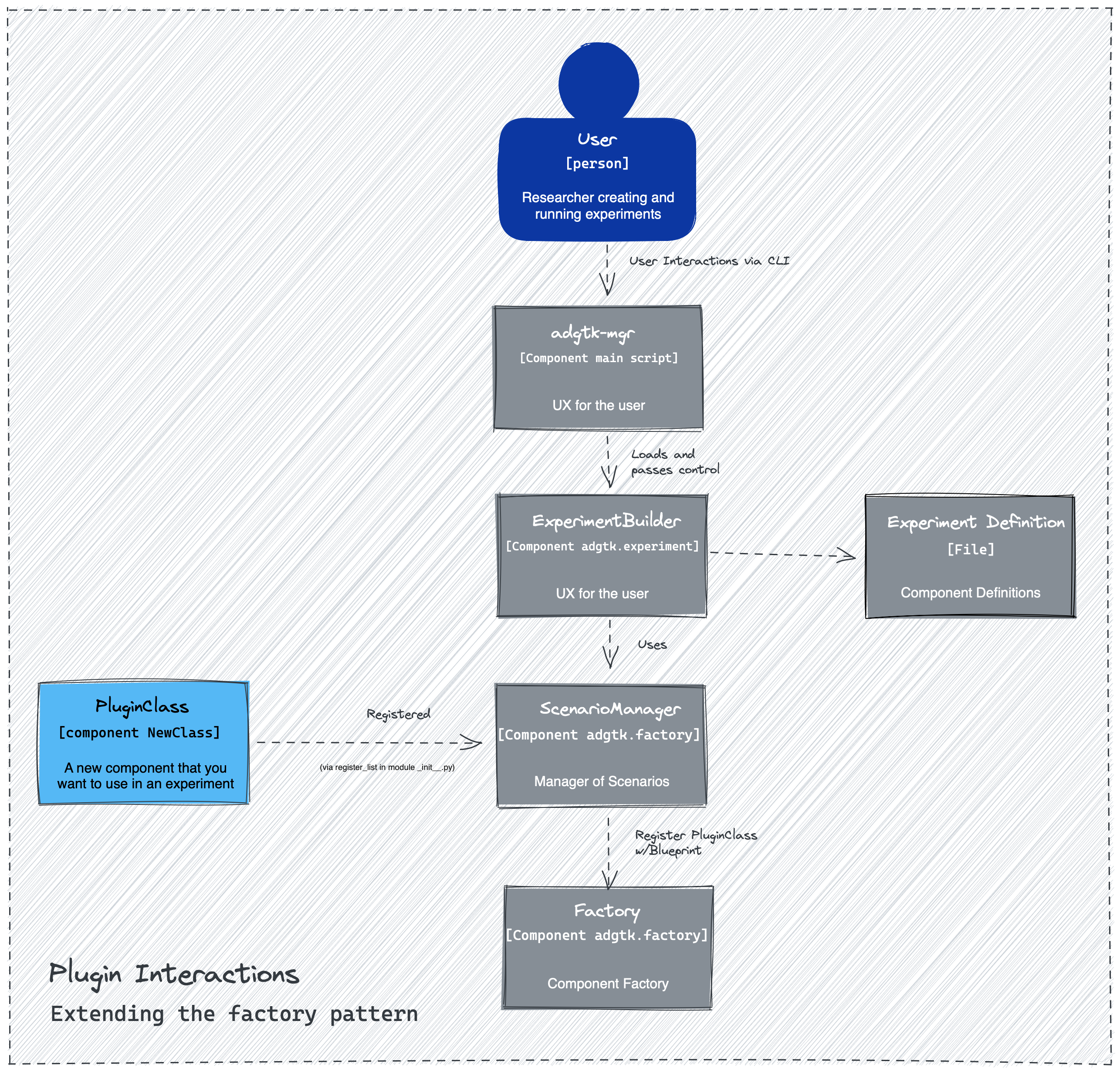
Building blocks
ADGTK components are the building blocks of an Experiment. The foundation to creating your own component is the FactoryBlueprint.
A FactoryBlueprint is a Dict with the following keys:
class FactoryBlueprint(TypedDict):
    group_label: Required[str]
    type_label: Required[str]
    arguments: Required[dict[str, ArgumentSetting]]
    introduction: NotRequired[str]
The ArgumentSetting supports the UX such as the wizard.
class ArgumentSetting(TypedDict):
    """The indiviudal setting."""
    help_str: Required[str]
    argument_type: Required[ArgumentType]
    default_value: NotRequired[Any]
    group_label: NotRequired[str]               # require when Blueprint
    list_arg_type: NotRequired[ArgumentType]    # arg type for lists
    list_group_label: NotRequired[str]          # for list of Blueprints
    list_intro: NotRequired[str]                # UX for lists
    list_min: NotRequired[int]                  # minimum list count
    introduction: NotRequired[str]
By having a consistent ArgumentSetting and Blueprint the factory can construct any type of component with a diverse set of parameters on init. The ArgumentSetting is only used by wizards, etc. This will be translated by the wizard into an internal representation that is used by the Factory to create the component. This is saved to disk as either a yaml or toml file in your experiment definition folder.
Creating a Component
In order for your component to be created by the Factory you must implement the FactoryImplementable Protocol. You need to have 3 items in your Class:
blueprint: FactoryBlueprint
description: str
__init__
Your class is required to have a blueprint and a description. The blueprint is used to create the component and the description is used when listing the components. You register your component with the factory in your module __init__.py file. Which is explained in more detail below.
Consider you have a new Class you want to use in experiments called MyComponent. It belongs to the group my-group along with other components of the same type. For this component you want to initialize with an int called counter.
from adgtk.common import FactoryBlueprint, ArgumentSetting
from adgtk.journals import ExperimentJournal

class MyComponent:

    description = "Used when listing factory details."

    # The blueprint is used for interacting with a user or agent to
    # describe your class and its arguments.
    blueprint: FactoryBlueprint = {
        "group_label": "my-group",
        "type_label": "my-component",
        "arguments": {
            "counter": ArgumentSetting(
                help_str="An example of how to tell the factory to pass a value",
                default_value=0,
                argument_type=ArgumentType.INT)
        }
    }

    def __init__(
        self,
        factory: ObjectFactory,
        journal: ExperimentJournal,
        counter: int,
        agent: ComponentDef
    ):
        self.counter = counter
There are two arguments that when present on your init cause the Factory to pass in as values. The two are factory and journal. If you do not need either then you can remove them from the init and the Factory will not pass them in.
You would want to use the Factory when your component needs to create child components. For example, an Agent that creates a policy based on a definition instead of being hard coded. The journal is used to track data and results.
Note
The factory and journal argument names are reserved so as to not conflict with the factory initialization. This design choice reduces the number of items in your configuration file.
in this example assume your module is named plugin. Your plugin module __init__.py file should have a register_list and look like:
# import your class
from .demo import MyComponent

# and the scenario manager / factory looks for register_list
register_list = [MyComponent,]
And the last step is to ensure your project.toml (or yaml) file has the user_modules set to your module name. This is how the Factory knows which modules to look for the register_list at.
user_modules = [ "plugin",]
Within the experiment definition file the definition will look like (assuming the user entered 5):
configuration:
  - group: my-group
  - type: my-component
    counter: 5
when the experiment definition is loaded by the ScenarioManager it instructs the Factory to create an instance of your MyComponent class with the counter set to 5. The factory will pass in the factory and journal as well as they are pre-defined in the Factory to instantiate the component when present.